
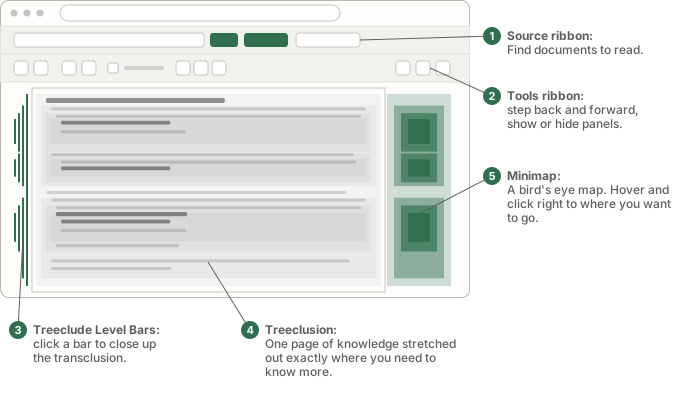
You can try Treeclusion in your browser, or install the Chrome extension (coming soon) for navigating websites with Treeclusion. If you use Obsidian, we have an Obsidian plugin (coming soon) too.
With a world of knowledge, it's very easy to get overwhelmed, distracted, and lost as you "surf" the web. When we use a browser, most links clicked happen with jump and a jolt and then a wait. The page disappears. Context is lost. Another page, perhaps with a different layout, appears in it's place. We have to work out where we are and how it's related to the previous page, and eventually how to get back. The more interconnected the material, the more we risk getting lost.
Treeclusion does the opposite. A link opens in place, as part of the page you are already reading — so the thing you followed it from is still in front of you. Open a branch to see its detail, collapse it when the detail stops mattering. The documents never move; only how much of them you are looking at changes.
A conventional link says hyper-jump somewhere. Inclusion says
But with Treeclusion, it's not somewhere else. It's been transported right here. That difference
is the whole idea. You keep the surrounding context while moving deeper into the material.
There is no re-orientation no worries about how to get back. And it keeps going. It nests! Another
It's a totally separate document, but instead of hyper-jumping, it's in-line. It's been "transcluded".
there's more over here. (click it, you'll see)
keeps its own identity.
document inside this document is "linked" here! (click this one too!)
That sketch is built from the browser's own <details> element. The renderer is considerably better behaved — it splits the paragraph at the click, so the text you were reading stays intact around the expansion.
The website reads ordinary files and folders — a public GitHub repo, or a local directory — and presents them as one continuously expandable document. No database, no knowledge-management system, no backend: it runs entirely in the browser tab.
The Chrome extension (coming soon) is the same renderer packaged to run standalone, and it can expand links on other people's sites too. It pays off most on pages with a lot of internal linking — documentation, wikis, API references, heavily cited articles. A single long essay with nothing to link out to has little for it to work with.
The Obsidian plugin (coming soon) supports opening up your Obsidian hierarch the same way with some additional features for easy navigation around the vaults.
Click About or Read in the header. Both open the renderer on the About page, and every link in it expands where you are.
Expanding a link on someone else's site means fetching that page, and most sites block that fetch from another origin by default. The extension asks Chrome for access the first time you open a link that needs it, one site at a time. Grant it only to sites you would trust with any other browser extension, and prefer per-site access unless you have a specific reason not to. Nothing fetched leaves your browser — see the privacy policy.
A working proof of concept, developed in the open and still changing. Nothing here measures you, so the only way we find out what reads badly is if you say so: